
Broadband Public Feedback
Feedback is essential to improving the accuracy of broadband data and mapping in California, as well as enhancing the map’s tools and features.
Please watch this webinar for additional instructions on how to access and fill out the CPUC’s Public Feedback survey on broadband availability.
How to give feedback on the California Interactive Broadband Map
-
To go directly to the Public Feedback survey, click here.
-
There are also two ways to submit feedback through the map interface:
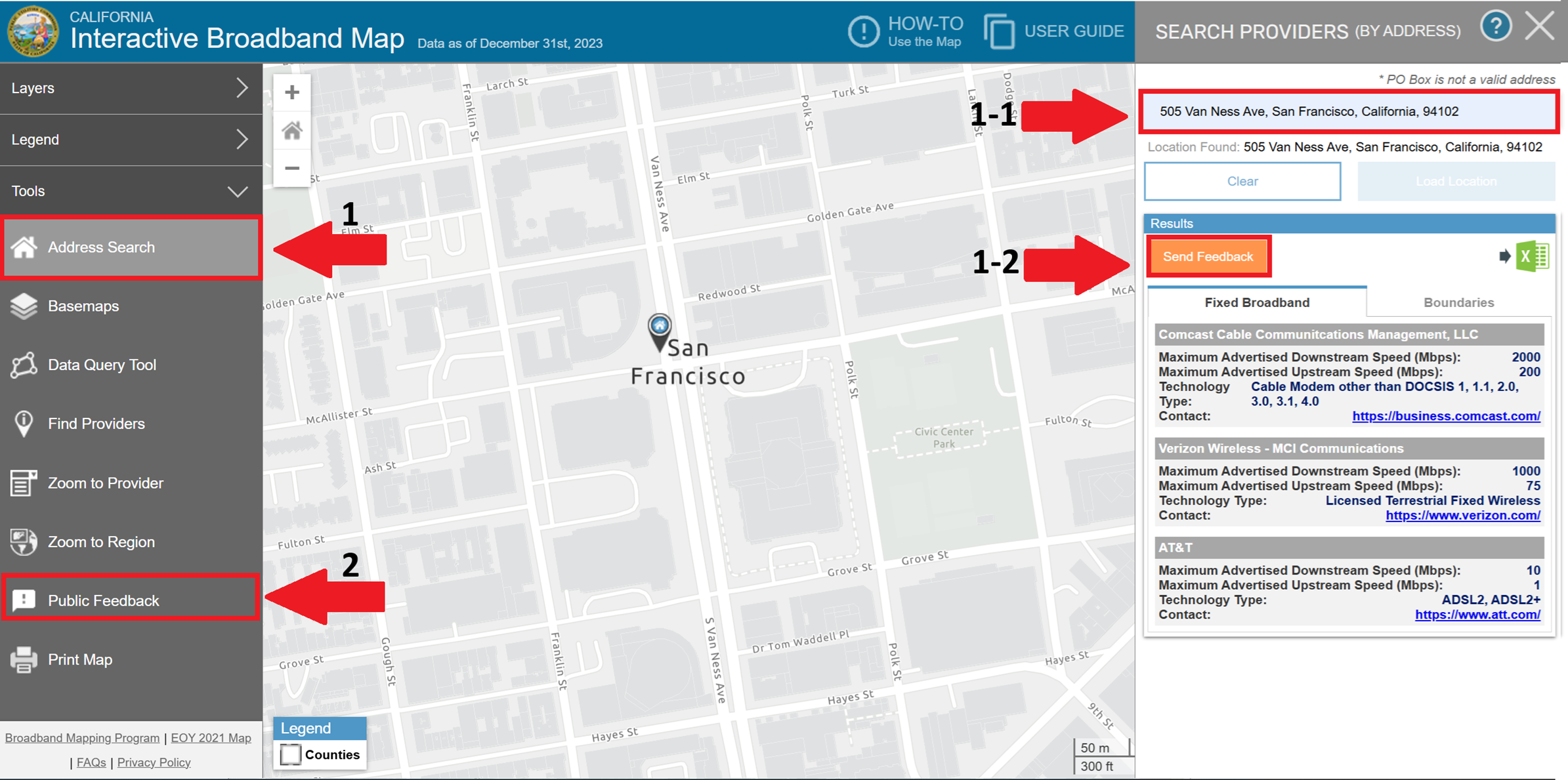
Option 1: Through the Address Search Tool
-
Click the “Address Search” button in the left-hand menu (see No. 1 in the image).
-
Enter the address for which you would like to provide feedback in the search box (see No. 1-1).
-
Click “Load Location” and wait for the location to display.
-
Once the information appears, click the “Send Feedback” button (see No. 1-2).
-
An “AB 286 Public Feedback Survey” window pop-up will appear.
-
Review the Privacy Policy and Notice of Information Collection and Publication, click “Next,” and proceed through the questions.
-
Complete and submit the Broadband Feedback Survey.
Option 2: Through the Feedback Tool
-
Click the “Public Feedback” button in the lower left-hand menu (see No. 2 in the image).
-
An “AB 286 Public Feedback Survey” window pop-up will appear.
-
Review the Privacy Policy and Notice of Information Collection and Publication, click “Next,” and proceed through the questions.
-
Complete and submit the Broadband Feedback Survey.
-
If you are unable to take the survey online at the desired location, you can complete the survey at a different location but designating your desired location in the survey and skipping the speed test.
-
Alternatively, you may print out a hard copy of the survey (here) and send the completed copy to the address listed on the hard copy.
Questions and comments: broadbandfeedback@cpuc.ca.gov